Backend Integration
OTP Webhook Contract
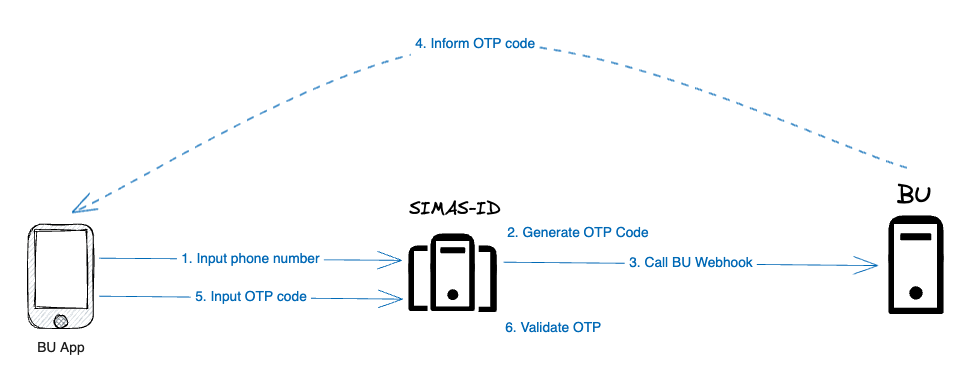 Currently, delivery process occurs at the client. So we need client to create a webhook that we can hit to inform the OTP code.
Please create the webhook with following contract:
Request:
http://xxx

Header:
- Authorization: Basic XXX
  {
  "identifier": "084512340987",
  "otp": "123456",
  "channel": "whatsapp" // email, sms, whatsapp
  }
- You free to define the URL.
- Implement basic authentication (BasicAuth).
Response:
{
"error": "unexpected_error",
"error_description": "Something Went Wrong"
}
After you finish developing, please inform us your:
- Webhook URL.
- BasicAuth username and password.
Validating Access Token
Validate on Client
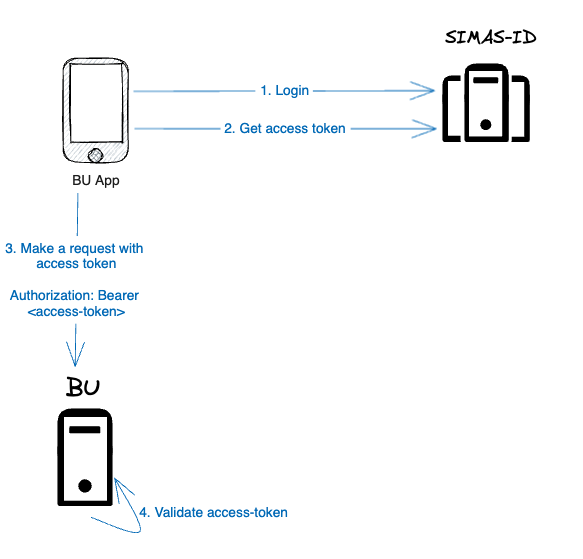 After login, access token will be included in every request. So, backend should verify whether request is valid or not by validating the access token.
-
Validate access token using JKWS URI.
- Staging: https://api-stg.simas-id.com/v1/oidc/certs
- Production: https://api.simas-id.com/v1/oidc/certs
-
If successful, perform extra validation by using access token claims. The metadata will look like (I only highlight a few that are important to use to validate):
- iss = Issuer (who created and signed this token) Value should be depended on the env:
aud = Audience (who or what the token is intended for) One of the values should be your client-id.
azp = Authorized party (the party to which this token was issued) This is optional, but if you want to make sure your client-id is the one that issued the token previously. So the value should be your client-id.
{
    ...
    "iss": "https://xxx/realms/simas-id",
    "aud": [
    "nanovest"
    ],
    ...
    "azp": "nanovest",
    ...
}
Note: client-id:
- For BU Nanovest → nanovest
- For BU SimInvest→ siminvest
Validate to SIMAS-ID
There is another way to validate your token. By calling SIMAS-ID.
This will increase the latency to perform the check.
curl --location '{{BASE_URL}}/v1/oidc/userinfo' \
--header 'Authorization: Bearer <access-token>'

Response:
{
    "sub": "279...9bf",
    "email_verified": false,
    "preferred_username": "6285610573956",
    "given_name": "John",
    "family_name": "Doe",
    "timestamp": "2023-10-13T08:27:25Z"
}
Note:
- Base URLs:
- Sandbox: https://api-stg.simas-id.com
- Production: https://api.simas-id.com
BE - BE Call to Store KYC Data
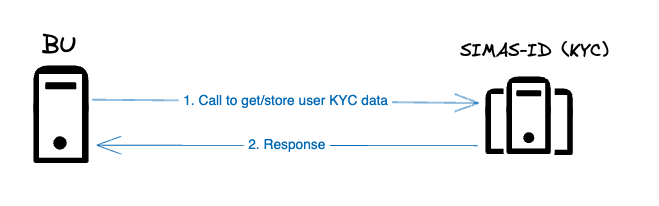
There are 2 endpoints related to user KYC data:
Store approved KYC data
POST {{BASE_URL}}/v1/common-kyc

Header:
Authorization: Basic <base64(ClientID:ClientSecret)>

Body:
{
    "client_id": "",
    "phone_number": "",
    "full_name": "",
    "nik": "",
    "date_of_birth": "",
    "email": ""
}

Response:
{
  "meta": {
    "id": "request_id",
    "status": "sucess",
    "message": "store common kyc data success"
  }
}
There are 2 scenarios this endpoint will be triggered:
- User complete KYC and has been approved by BU.
- User update their KYC data, reviewed and approved by BU. Means, only approved KYC data by BU is sent to us.
Get user KYC data by phone number
GET {{BASE_URL}}/v1/common-kyc?phone_number=628xxx

Query Params:
phone_number - required

Header:
Authorization: Basic <base64(ClientID:ClientSecret)>

Response:
{
    "data": {
        "id": "",
        "client_id": "",
        "phone_number": "",
        "full_name": "",
        "nik": "",
        "date_of_birth": "",
        "email": "",
        "created_at": ""
    },
    "meta": {
        "id": "request_id",
        "status": "sucess",
        "message": "get common kyc data success"
    }
}
This endpoint can be called by BU to pre-filled KYC form on their native app/website when user first login to he BU system.
Note:
- Base URLs:
- Sandbox: https://sqekyc.stg.squantumengine.com
- Production: https://sqekyc.squantumengine.com
- ClientID and ClientSecret will be sent separately.